Korean character
Append '\usepackage{kotex}' in the manimlib/tex_template.tex file.
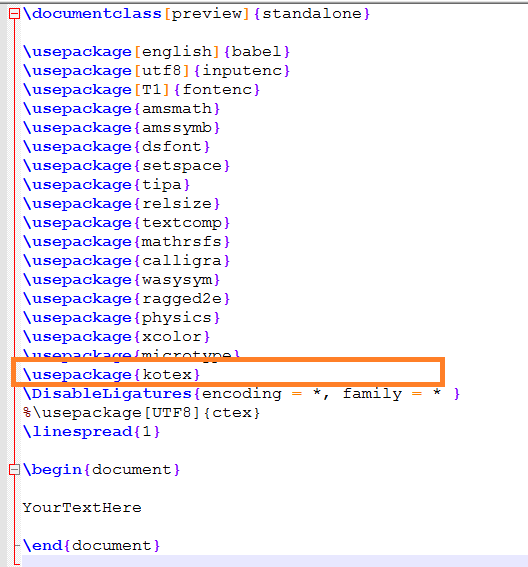
Chinese character
Chinese character package is already included in the manimlib/template.tex file as below.
If you couldn't display Chinese character, check whether the 'ctex' package is in the template.tex file.
And edit configuration in 'constants.py'
TEX_USE_CTEX = True # Support Chinese
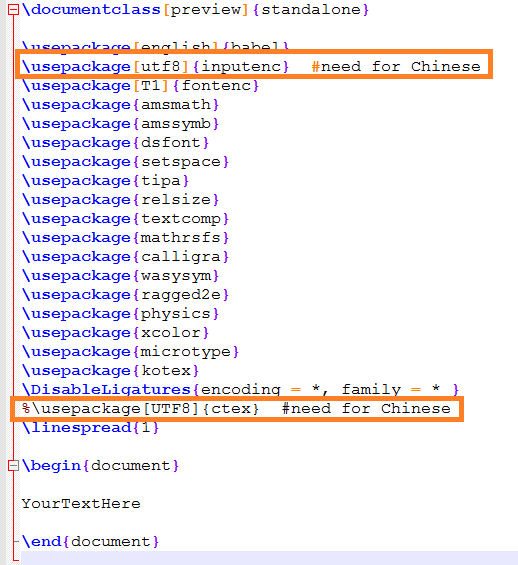
The above Chinese character setting is referenced here.
Japanese character
As I know, it's a default setting to use Japanese character in the manimlib/template.tex. Otherwise, please refer to this page to support Japanese characters.
Next: [03]Hello Manim
[03]Hello Manim
The first thing to do when learning a programming language is to print a simple string like “Hello World”. Here again, we will make a video that prints "Hello Manim" string on the screen. This way..
infograph.tistory.com
Go To: [99] Table of Contents
'Programming > Manim Lectures' 카테고리의 다른 글
| [03-1] Create "Hello Manim" (notepad++) (0) | 2020.05.31 |
|---|---|
| [03]Hello Manim (0) | 2020.05.31 |
| [02-3]Using the Manim in the new directory (0) | 2020.05.31 |
| [02-2]Download and Install the Manim package (0) | 2020.05.31 |
| [02-1]Basic environment configuration and required library installation (2) | 2020.05.31 |


